Sample Manager
The Sample Manager organises a project containing many samples — from a single bake-out series to an entire instrument's data over months. Each sample is a sheet (or set of sheets) in the underlying KherveFitting Excel workbook.
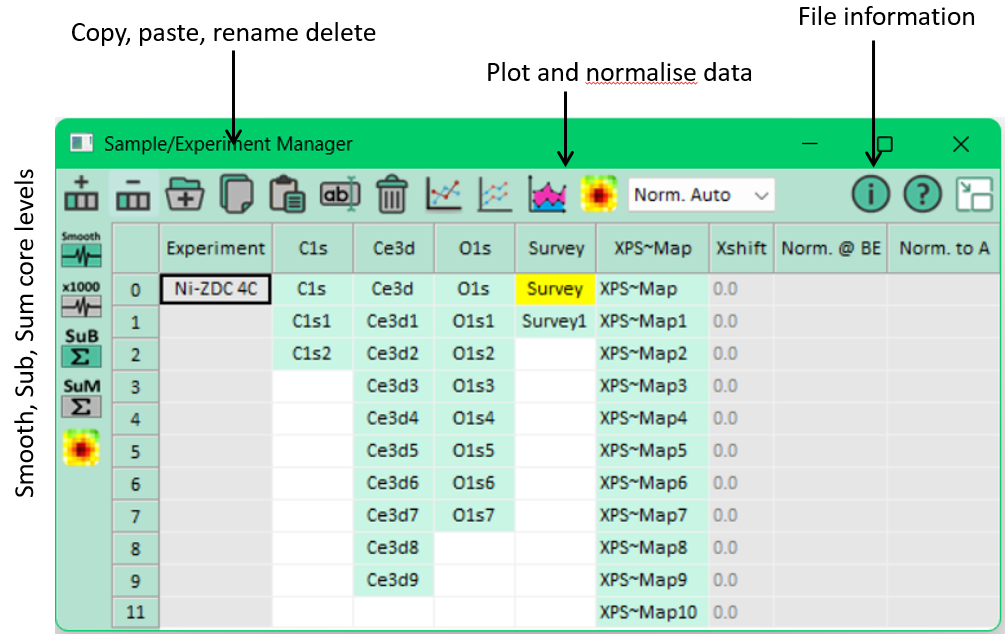
Metadata columns
KherveFitting 2.0 added richer metadata columns:
- Sample name
- Technique (XPS, Auger, XAS, …)
- Operator
- Date / time
- Any number of custom columns
Columns can be hidden, reordered, and edited inline.
Batch rename
Multiple sheets can be renamed in one operation — useful for quickly relabelling a sputter
series (as-is, etch-1, etch-2, …) or applying a consistent naming convention across
a project.
File-manager integration
Renaming or reorganising sheets refreshes the file-manager grid in place — no need to close and reopen the workbook.
Casa Info parsing
When importing Casa exports, sample metadata is parsed into the Sample Manager automatically.